Troubleshooting
Fixes for common problems with installing Termul, starting agents, and using the browser version.
This page lists problems that Termul users run into, and how to fix them. If your problem is not here, see Report a problem.
macOS does not open Termul after a DMG download
If you download the .dmg file in a web browser and install from it, macOS Gatekeeper can stop the app from opening. Gatekeeper is the macOS check for apps from the internet.
Install Termul with Homebrew or the install script instead. Both install the same app without this problem:
brew tap gnoviawan/termul
brew install --cask termul
curl -fsSL https://raw.githubusercontent.com/gnoviawan/termul/v0.4.21/scripts/install.sh | bashIf you already installed from the DMG, you can remove the download mark from the app yourself. The install script runs this same command:
xattr -dr com.apple.quarantine "/Applications/Termul Manager.app"Linux: the termul-manager command is not found
The install script puts the AppImage at ~/.local/bin/termul-manager and adds Termul Manager to your app menu. If the script warns that ~/.local/bin is not in PATH, your shell cannot find the command. Add the folder to PATH in your shell profile, for example in ~/.bashrc:
export PATH="$HOME/.local/bin:$PATH"The install script supports only x86_64 Linux. On other processors it stops with Unsupported Linux architecture.
An agent shows "Needs Node.js" or "Install"
Many agents run with Node.js or with uv, a Python tool. Termul shows the state of each agent in Settings > AI Agents and in the agent picker of a new chat.
- Needs Node.js or Needs Node means Termul cannot find
npx. Install Node.js. In a new chat, the Runtime required message has an Install Node.js button that opens the download page. - Needs uv means Termul cannot find
uvx. Install uv. The Install uv button opens its install page. - The Claude agent needs Node.js 22 or newer, with npm.
- Install from Agent Chat, or Install required in a new chat, means the agent is not installed yet. Open a new chat with that agent and select Install.
- Manual install means you must install the agent from its maker. Then make sure its command is on your
PATH.
Termul reads your PATH once, when it starts. On macOS and Linux it reads it from your login shell. After you install Node.js or uv, quit Termul completely and open it again. A new window is not enough.
In the browser version, the agents run on the computer with the server. Install Node.js or uv on that computer, then restart the server.
For more about agents, see Agent setup.
The browser version asks for an access token
A server that other devices can reach asks for an access token. If your browser does not have the token, or the token changed, Termul shows Server access token required.
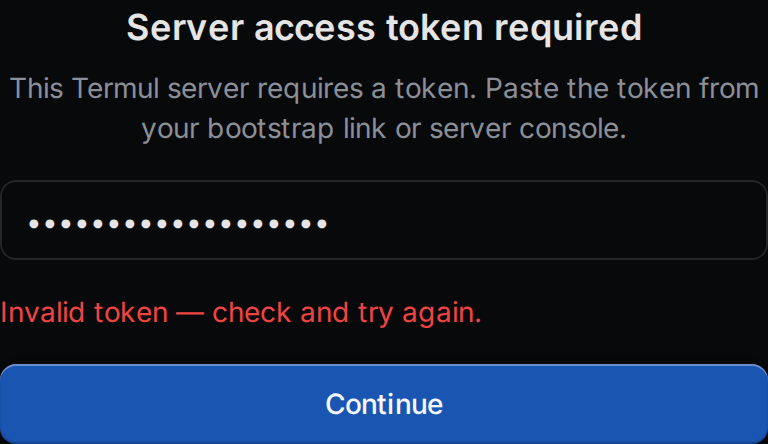
- Get the token.
- If you have the link with
#token=at the end, the token is the text after#token=. - If the server made the token itself, it is in a file named
web-auth-tokenin the server's state folder. On Linux and macOS that is~/.local/state/termul/web-auth-token. On Windows it is in%LOCALAPPDATA%\Termul. - With Docker, run
docker compose exec termul-server cat /home/termul/.local/state/termul/web-auth-token. - If you started the server with
--web-auth-tokenorTERMUL_WEB_AUTH_TOKEN, use that value.
- If you have the link with
- Paste the token and select Continue.
Invalid token means the token is wrong or the server has a new one. Could not reach the server means the browser cannot connect. Check the address and that the server runs.
On an iPhone or iPad, a Termul icon on the home screen keeps its own storage. Enter the token there once, even if Safari already has it.
For setting up the server, see Browser and phone.
The browser version shows "Host offline"
Host offline means the server stopped, for example for a restart or an update. Termul keeps checking. When the server answers again, Termul reconnects by itself.
- Start the server again if it does not come back on its own.
- To check right away, select the status light at the bottom of the window, or Retry.
- A terminal shows Host offline and says that input is buffered. Termul keeps what you type, up to a limit, and sends it when the server is back.
Reconnecting… is different. It means the connection dropped, for example on a bad network, and Termul is trying again.
A shortcut opens a browser action instead
Browsers keep some keys for themselves, such as Ctrl+T for a new tab and Ctrl+W to close one. The browser version of Termul uses Alt for these shortcuts: Alt+T for the agent launcher, Alt+W to close a tab, and Alt+, for settings. See the full list in Keyboard shortcuts.
If a shortcut still goes to your browser or to your operating system, give it other keys in Settings > Keyboard Shortcuts.
Notifications do not appear in the browser version
Browsers show notifications only for pages on https:// or localhost. See Notifications.